AKS Network Flow: Chrome Browser → Ingress → Service → Pod
This page explains the end-to-end request journey from an end user typing a URL in Chrome, through DNS resolution, Azure networking boundaries, ingress routing, Kubernetes services, and finally to the application Pod.
HTTP/HTTPS
DNS
AKS
Ingress
VNet + Subnets
NSG + Routes
Architecture Diagram
aks-arch.png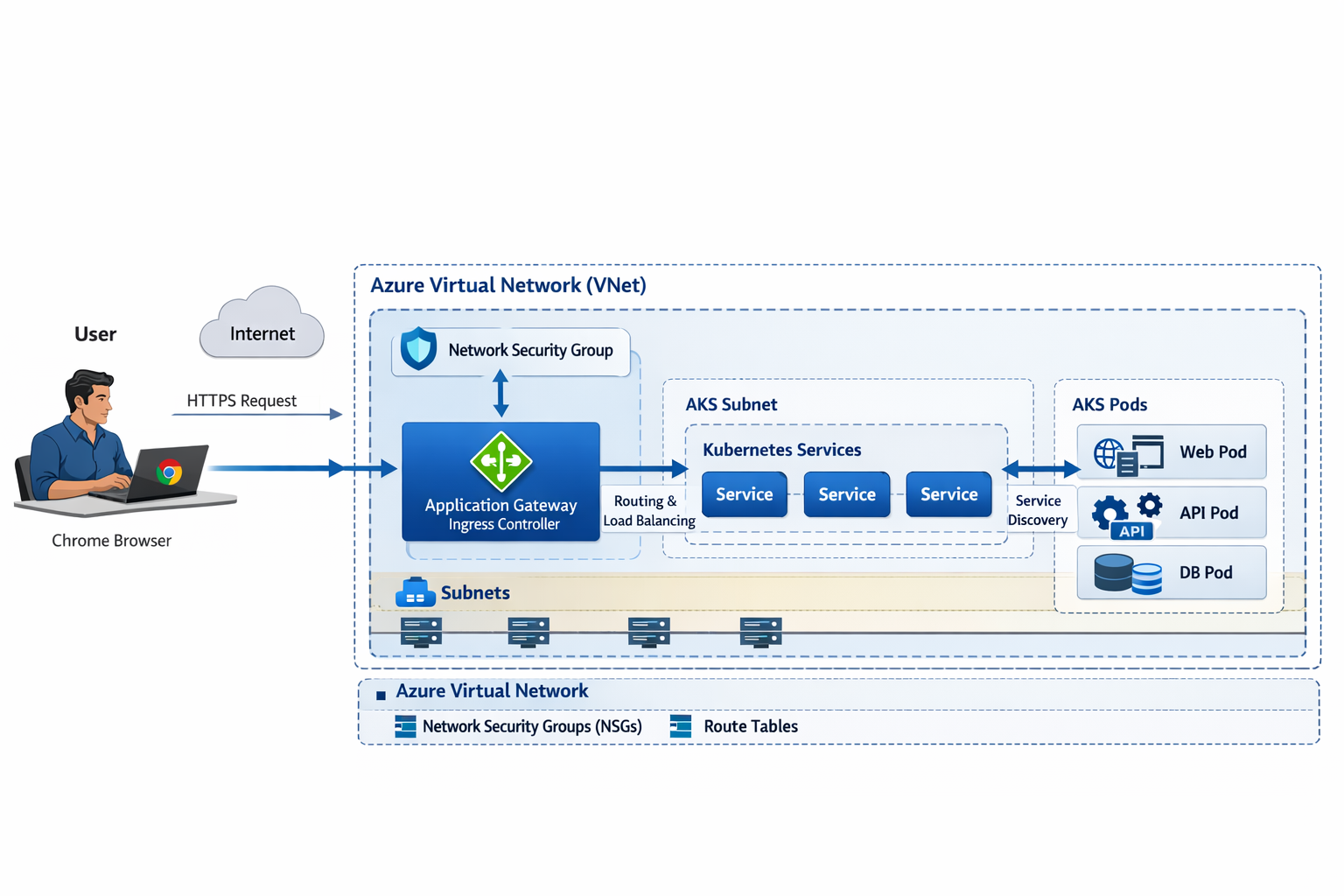
Network Flow (Outer → Inner)
High-level mental model
The browser first resolves a hostname via DNS, then sends an HTTPS request to a public endpoint.
Azure networking controls (VNet/Subnets/NSGs/Routes) govern traffic boundaries, and Kubernetes
controls (Ingress/Service/Pod endpoints) govern application routing inside the cluster.
1
Chrome Browser: user enters the hostname
Example:
http(s)://spring-ui-api.dev.yourcompany.com/.
Chrome determines if it should use HTTP or HTTPS and initiates name resolution.
2
DNS Resolution: hostname → public IP
The hostname (A record) resolves to the public IP of your ingress entry point.
In a typical AKS setup, that public IP belongs to the Ingress Controller Service
(type LoadBalancer) or to an upstream gateway (if you use one).
Expected:
INGRESS_HOSTNAME → EXTERNAL-IP of NGINX ingress controller (or App Gateway IP).
3
Internet → Azure Edge → Your public endpoint
The client establishes a TCP connection and sends HTTP(S) traffic to the resolved IP.
The public IP is associated with an Azure load-balancing/gateway layer that forwards traffic into your cluster entry point.
4
Azure Virtual Network (VNet): the network boundary
The VNet is your private network perimeter in Azure. It contains the subnets that host AKS node pools and,
depending on architecture, ingress/gateway resources. VNets provide routing, isolation, and integration points
(peering, VPN/ExpressRoute, Private Endpoints).
5
Network Security Group (NSG): L3/L4 allow/deny rules
NSGs are applied to subnets or NICs to control inbound/outbound flows using IP/port/protocol rules.
Think of NSG as a “cloud firewall policy” at the subnet/NIC level.
Typical ingress-related rules: allow inbound
80/443 to the ingress endpoint,
allow node-to-node traffic as required by AKS, and restrict admin ports.
6
Ingress Entry: Application Gateway Ingress Controller (AGIC)
In an AGIC architecture, Azure Application Gateway is the L7 reverse proxy and AGIC watches Kubernetes Ingress
resources and programs App Gateway routing rules accordingly. The gateway then forwards traffic to backend services in AKS.
Note: Your diagram shows Application Gateway Ingress Controller.
If you are using NGINX Ingress Controller instead, the concept is the same:
“Ingress Controller” is the L7 router implementing Kubernetes Ingress rules.
7
AKS Subnet: where node pools live
AKS nodes (VMSS instances) sit inside the AKS subnet. Depending on networking choice (Azure CNI),
Pods can receive IPs from the VNet/subnet and become first-class VNet citizens.
8
Route Tables (UDR): where packets should go next
Route tables define how traffic is routed between subnets and to external destinations.
In advanced setups, UDRs send traffic to firewalls, NAT, or hub/spoke shared services.
Even when you do not manage UDRs explicitly, AKS relies on correct routing for Pod/Service connectivity.
9
Kubernetes Service: stable virtual IP + load balancing to Pods
A Service (ClusterIP) provides a stable endpoint and load balances to the matching Pod endpoints.
Your ingress forwards to the Service, not directly to individual Pods.
10
Pod reached: application handles the request
The request is delivered to one Pod replica (based on the Service endpoint selection).
Your Spring Boot app receives it on
containerPort 9087 and returns a response.
Flow at a glance
- Chrome requests hostname
- DNS resolves → public IP
- HTTPS → public endpoint
- VNet boundary
- NSG allow/deny
- Ingress Controller routes
- AKS subnet nodes/pods
- Route tables steer traffic
- Service → endpoint selection
- Pod handles request
Common failure points
- DNS not pointing to ingress IP
- NSG blocks 80/443
- Ingress controller missing
- Service selector mismatch
- Readiness probe failing
Azure Services & Their Roles
DNS (Azure DNS or external DNS)
Resolves the application hostname to a public IP. The IP should point to your ingress entry point.
Without correct DNS, the browser cannot find the destination.
Azure Virtual Network (VNet)
Private network perimeter. Hosts subnets, provides isolation, routing, peering, and connectivity integrations
(VPN/ExpressRoute, Private Link).
Network Security Group (NSG)
Subnet/NIC-level inbound/outbound rules (L3/L4). Controls which ports and sources can reach ingress and nodes.
Application Gateway Ingress Controller (AGIC)
Bridges Kubernetes Ingress resources into Azure Application Gateway configuration.
Performs L7 routing, path-based routing, host-based routing, and can integrate WAF if enabled.
AKS Subnet
Subnet containing AKS node pools (VMSS). With Azure CNI, Pod IPs may be allocated from the VNet
so Pods are addressable within the VNet routing domain.
Route Tables (UDR)
Defines routing between subnets and to external networks. Used for hub/spoke, firewall insertion,
NAT routing, and consistent egress control.
Kubernetes Ingress
Declarative rules (host/path → service:port). The controller reads these and implements routing.
Kubernetes Service (ClusterIP)
Stable virtual endpoint inside the cluster that load balances to Pod endpoints based on label selectors.
AKS Pods (Replicas)
Actual runtime workload. The Service chooses one Pod instance; readiness/liveness probes influence whether Pods
are eligible to receive traffic.
Key point
The browser never “talks to a Pod directly.” It talks to a public endpoint, which routes through ingress and then to a Service,
and the Service finally load balances to the Pod endpoints.